
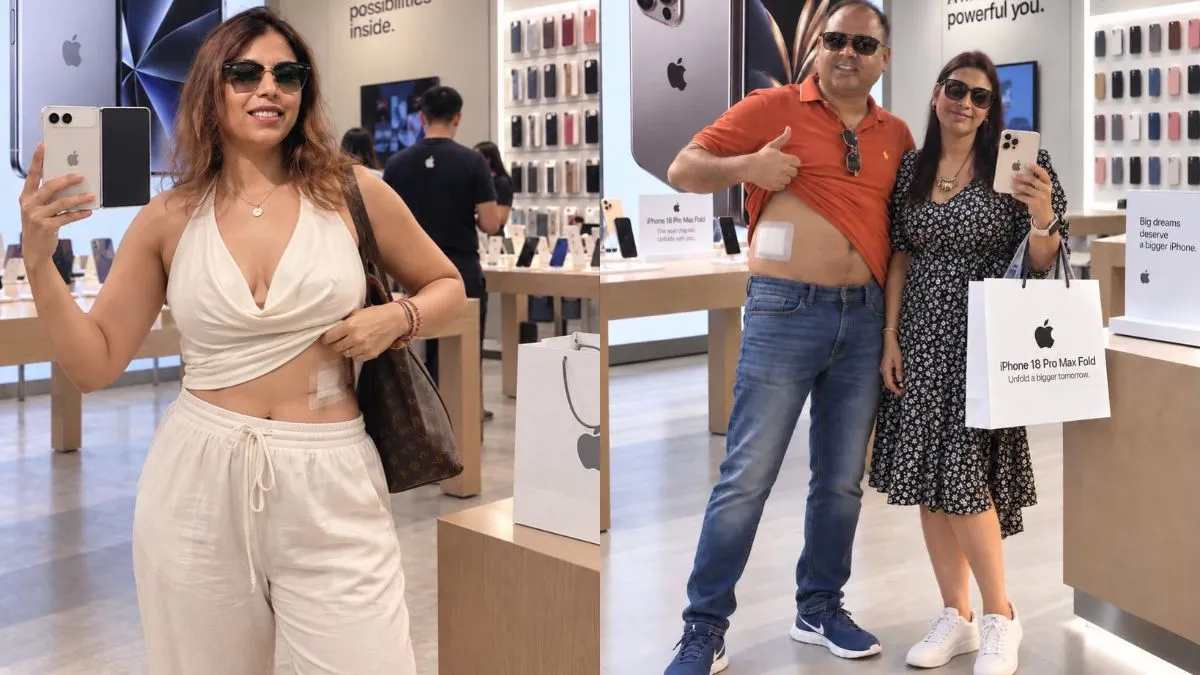
The iPhone 18 launch has given the old "sell your kidney for an iPhone" joke a very visual makeover. Across social media, the joke is being turned into AI-generated photos of people lying in hospital beds, sporting bandages and proudly showing off the expensive phone they supposedly sacrificed an organ for. The result is deliberately absurd, but realistic enough to look like an actual photograph at first glance.
The trend also leaves plenty of room to play with an ordinary photo. You can upload a picture of yourself, or one featuring two people, and use an AI image generator to turn it into a completely different scene while keeping the people recognisable. The prompts below are designed to work with either kind of photo, with different versions of the iPhone 18, including the iPhone 18 Pro, iPhone 18 Pro Max and iPhone Duo, used to create the joke in different ways.
7 prompts to create viral iPhone 18 'surgery' photos
1. Hospital bed with iPhone 18 Pro Max
"Transform the uploaded photo into a highly realistic photograph of the same person or people recovering in a modern hospital room after a fictional surgery. Keep their original facial features, identity, hairstyle, skin tone, body proportions and overall appearance clearly recognisable. If the uploaded photo contains two people, keep both people in the scene naturally. Place the person or people on or beside a hospital bed, with realistic hospital clothing, large abdominal bandages and hospital wristbands. Add an IV stand, medical equipment, white bedding and soft clinical lighting. The person or people should be proudly holding exactly one iPhone 18 Pro Max towards the camera, making the phone the clear focus of the photograph. Do not create any additional phones. Make the scene look like a convincing social media photograph with a humorous, exaggerated feel. No blood, open wounds or graphic medical details."
2. Post-surgery selfie with iPhone 18 Pro
"Edit the uploaded photograph into a highly realistic post-surgery hospital selfie while keeping the same person or people completely recognisable. Preserve their faces, hairstyles, skin tones, expressions and general appearance from the original image. Change the setting into a realistic hospital recovery room and add abdominal bandages, hospital wristbands and subtle medical equipment. The person or people should be proudly showing exactly one iPhone 18 Pro to the camera, as if the new phone is the most important thing about their recovery. If there are two people in the original photograph, keep both of them naturally positioned together while showing only one iPhone 18 Pro in the entire image. Make it look like a casual photograph taken on a phone, with realistic lighting, reflections, hands and proportions. Keep the medical elements non-graphic."
3. iPhone Duo recovery room photo
"Use the uploaded photo as the identity reference and transform it into a photorealistic hospital recovery scene. Keep the same person or people, facial features, hairstyles, skin tones and overall appearance. If the original photograph has one person, retain one person; if it has two people, retain both. Place them in a realistic hospital room with a bed, white sheets, an IV stand and subtle medical equipment. Add large abdominal bandages and hospital wristbands to create an exaggerated post-surgery appearance. The person or people should proudly hold exactly one iPhone Duo, Apple's foldable iPhone 18 model, towards the camera. The iPhone Duo should be clearly recognisable as the main object in the image, with no other smartphones visible anywhere. Keep the photograph natural, humorous and believable, without blood or graphic injuries."

4. Walking out of hospital with iPhone 18 Pro Max
"Transform the uploaded photograph into a highly realistic photograph of the same person or people leaving a modern hospital after a fictional surgery. Preserve their original identity, facial features, hairstyles, skin tones and natural appearance. Keep one or both people depending on the uploaded photograph. Place them in a hospital corridor or near the entrance, with realistic glass doors, reception areas and subtle medical surroundings. Add visible abdominal bandages and hospital wristbands. Have the person or people proudly display exactly one iPhone 18 Pro Max towards the camera, with the phone clearly visible and treated as the centre of attention. Do not add any second phone. Make the scene look like a candid viral social media photograph, with natural lighting and realistic proportions. Keep all medical details non-graphic."
5. Inside an Apple Store with iPhone 18 Pro
"Edit the uploaded photo into a highly realistic photograph inside an Apple Store. Keep the same person or people from the original photograph clearly recognisable, preserving their facial features, hairstyles, skin tones and general appearance. If the original photo has two people, keep both naturally together. Give the person or people visible abdominal bandages and a hospital wristband, as though they have just come from a fictional surgery. Place them inside a realistic Apple Store with wooden display tables, iPhone displays, bright store lighting and softly blurred customers in the background. The person or people should proudly hold exactly one iPhone 18 Pro after buying it. Make sure there is only one iPhone visible in their hands and no additional phones elsewhere in the scene. The contrast between the hospital bandages and excitement over the iPhone 18 Pro should create the humour. Keep the image photorealistic and non-graphic."
6. Hospital mirror selfie with iPhone Duo
"Transform the uploaded photograph into a realistic mirror selfie taken inside a hospital recovery room. Keep the same person or people recognisable, including their facial features, hairstyle, skin tone, body proportions and overall appearance. Preserve the original relationship and positioning if there are two people. Add realistic hospital clothing, abdominal bandages, hospital wristbands and subtle medical equipment in the background. The person or people should pose in front of a hospital mirror while proudly holding exactly one iPhone Duo, the foldable iPhone 18 model, towards the mirror. The iPhone Duo should be the only smartphone visible anywhere in the photograph. Make the image look like an ordinary social media selfie that has been given an absurd post-surgery twist. Use realistic reflections, hands and lighting, with no blood or graphic medical details."
7. iPhone 18 Pro Max family photo after 'surgery'
"Take the uploaded photograph and transform it into a highly realistic, humorous family-style photograph while keeping the same person or people from the original image clearly recognisable. Preserve their faces, hairstyles, skin tones, expressions and overall appearance. If the uploaded photograph has one person, keep one person; if it has two people, keep both. Give the person or people subtle signs of having supposedly undergone a fictional surgery, including large abdominal bandages and hospital wristbands. Set the scene in a realistic home or recovery environment, with natural lighting and everyday surroundings. The person or people should proudly show exactly one iPhone 18 Pro Max to the camera as though the expensive new phone makes the entire ordeal worthwhile. Do not add any other smartphones. Keep the image photorealistic, casual and humorous, with no blood, open wounds or graphic medical details."
ALSO CHECK OUT:
Looking for a ChatGPT prompt for the 1980s AI photo trend? Try these 8 ideas
The idea is less about creating a brand-new person and more about giving an existing photograph an outrageous new context. Whether it is a hospital recovery room, a mirror selfie or an Apple Store visit, keeping the original people recognisable while changing the setting and adding the iPhone 18 creates the visual punchline. These prompts can be tweaked further depending on the photograph you start with, but the basic joke stays the same.