
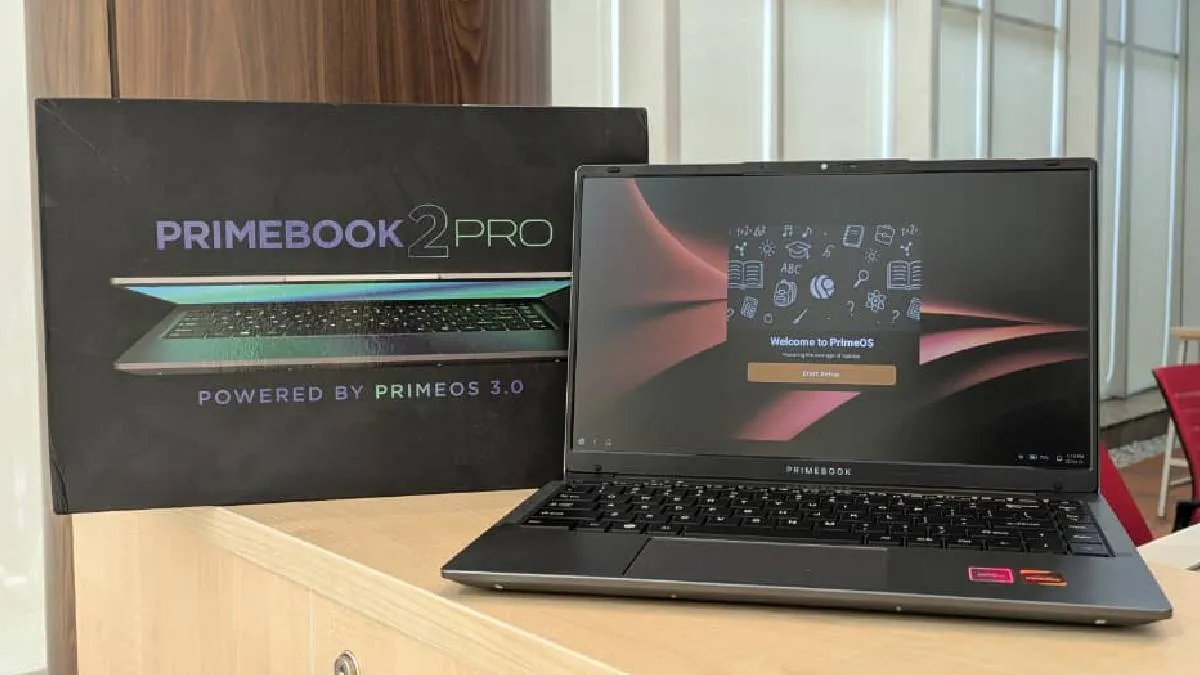
Primebook, Indian startup focused on Android laptops, has launched a new laptop in India: the Primebook 2 Pro. This device boasts an improved display, a bigger battery, and more RAM, alongside a decent build quality when you compare it with Primebook 2 Neo. After using the Primebook 2 Pro for a few weeks, I’m ready to share my overall experience. But before diving into the full review, let's take a detailed look at its specifications.
Primebook 2 Pro review: Specifications
| Model | Primebook 2 Pro |
| Price and variants | Rs 18,990 (8GB/128GB) |
| Colours | Silver |
| Availability | Primebook official website, Flipkart and Amazon |
| Display size | 14.1-inch Full HD IPS matte display |
| Security | Pin, password |
| Camera setup | Single camera |
| Chipset | MediaTek Helio G99 |
| RAM and storage | 8GB+128GB |
| Battery and charging | 60.3 Wh battery |
| Operating system | PrimeOS 3.0 based on Android 15 |
| Ports |
3 (USB Type A), 1 microSD slot, 1 USB Type C, 1 USB Type C charging and 3.5 audio jack |
Primebook 2 Pro review: Design
The Primebook 2 Pro laptop has a better build quality than the Primebook 2 Neo, which instills confidence. For audio, it features a total of four speakers: two on the front and two on the bottom.

Ports and Connectivity
The laptop offers ample ports for connecting external accessories. Specifically, it includes three USB Type-A ports, one USB Type-C port, one microSD card slot, and a 3.5mm audio jack.
Keyboard and Trackpad
The keyboard is large, with keys that are big enough for comfortable typing. The keys have a shallow travel distance but there is also a noticeable deck flex in the center. However, the overall quality of the keyboard is decent, which is acceptable considering the laptop's price. The trackpad is easy to operate and large enough for efficient task management.
Features and Portability
Enhancing overall privacy, the laptop's camera setup includes a physical slider to hide the camera when it's not in use. Considering its overall size, the laptop has a light weight.
The retail box contains a USB Type-C charging adapter, but the laptop is strictly limited to charging only with that specific adapter.
Primebook 2 Pro review: Display
It features an anti-reflective coating that effectively reduces glare. Furthermore, the viewing angles are excellent, allowing users to see images clearly from virtually any position. The screen is modern, thanks to the small bezels surrounding the display.
While the company has not specified the refresh rate or the exact brightness level, the display is sufficiently bright for outdoor use cases. The screen feels decently smooth in operation, which suggest 60Hz refresh rate, but we still lack official information regarding its refresh rate.
Primebook 2 Pro review: Performance
Audio
Starting with audio performance, the laptop features four speakers—two located on the top and two on the bottom. The overall sound performance of the laptop is good. You can comfortably enjoy videos and music in a room with background noise, such as a running fan or people talking, without much difficulty.
Camera Quality
Now, addressing the camera, the quality is decent. Again, the company has not specified any technical details about the camera, but its quality is workable. Users should not expect exceptional performance from it, but it handles basic needs.
Overall Performance and Experience
The overall performance of the laptop is solid for everyday use. It is good at handling basic multitasking, such as browsing the internet on one side and keeping files open on the other. During my time with it, the laptop did not exhibit any lagging. However, based on the processor's specifications, users should not expect this laptop to handle intensive tasks (like complex video editing or demanding gaming).
Speed Highlights
When I connected my pen drive, I could not find the option to copy files from the pen drive to the laptop's internal storage. However, the laptop opened my files quickly, an action the OnePlus Pad 3 was struggling with.
Software Optimisation and Lag
However, I faced some optimisation issues. For example, when using applications like WhatsApp Web, it took a noticeably long time to load messages. I also noticed that the web browser was freezing inactive tabs to conserve RAM while browsing, which negatively impacted the user experience.
Operating System and Customisation Issues
The company has replicated the Android OS's complicated internal drive structure. This makes it difficult to browse media in the internal storage when trying to upload files to the internet. Instead of a simple 'Downloads' folder, it presents all files thorugh 'media picker'. This issue persists even after the company attempted to customise the OS. Since this laptop is positioned as an alternative to Windows OS, the company should have customised the file structure to be more user-friendly.
Missing Features
Furthermore, I was unable to find an option to access Cloud PC, despite hearing that the laptop is supposed to come with this feature to allow access to Windows applications.
Primebook 2 Pro review: Battery
- Battery Life: The laptop offers excellent endurance, lasting many days in standby mode and delivering around 7-8 hours of working time on a full charge.
- Charging Speed: It takes about 2 hours and 20 minutes to fully charge using its adapter. We observed quick initial charging, reaching 24 per cent in 23 minutes and 62 per cent in 1 hour and 2 minutes.
Primebook 2 Pro review: Verdict
The Primebook 2 Pro is a compelling budget-friendly option for users seeking an affordable laptop primarily for light productivity and media consumption, backed by the familiar Android ecosystem.
Pros:
- Exceptional Battery Life: The laptop's 60.3 Wh battery delivers outstanding endurance, offering 7–8 hours of working time.
- Improved Display Quality: The 14.1-inch Full HD IPS matte display offers excellent viewing angles and reduced glare, which is a significant upgrade in this segment.
- Solid Performance for Basics: Powered by the MediaTek Helio G99 chip and 8GB of RAM, the device handles essential tasks like web browsing and light multitasking smoothly without lag.
- Decent Build Quality: It offers a better and more confidence-inspiring build compared to its predecessor.
Cons and Trade-offs:
- Significant Software Issues: The primary drawback is the poor software optimisation, which causes long loading times for certain apps (like WhatsApp Web) and freezing of inactive browser tabs.
- Complicated File Structure: The operating system’s replication of the complex Android internal drive structure makes file browsing and uploads unnecessarily difficult.
- Proprietary Charging Limit: The laptop is strictly limited to charging only with the included USB Type-C adapter, which reduces flexibility.
- Missing Features: The noted absence of the "Cloud PC" feature suggests a gap between advertised and actual functionality.
Who should buy it:
The Primebook 2 Pro is an excellent choice for students or light users on a strict budget who prioritise long battery life and a good screen for consuming content. However, potential buyers must be prepared to tolerate current software optimisation issues and the complicated file management system. It is a capable daily driver, but not suitable for users who require heavy multitasking or plan on running demanding applications.
ALSO READ: Primebook 2 Neo review: Affordable Android laptop with Windows feel