
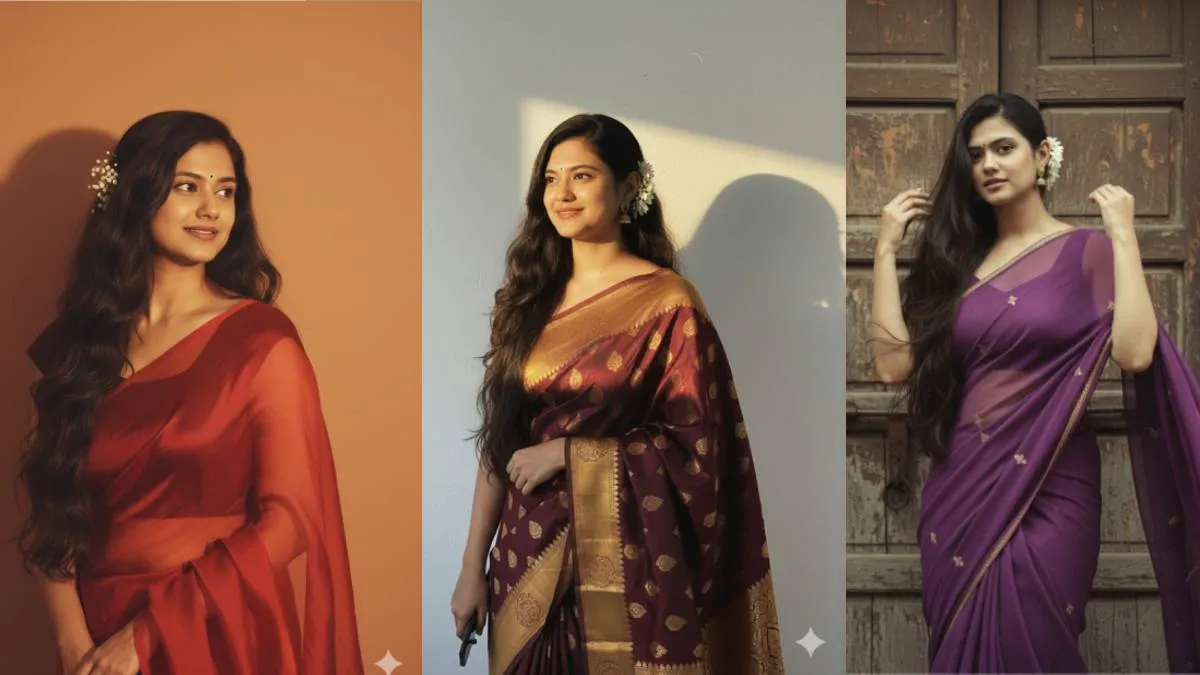
Google has introduced a new AI tool called Nano Banana, available through its Gemini AI platform. This tool allows users to create retro-style images, which are becoming very popular on social media platforms like Facebook, WhatsApp, and Instagram, especially among Gen Z users. These images are known for their realistic details, including facial expressions, clothing, and background elements.
What is Nano Banana AI?
Nano Banana is a new image tool within the Gemini 2.5 Flash AI chatbot. The images it generates have a nostalgic, retro feel and are gaining traction online. This advanced model is capable of creating highly detailed images that look incredibly real. Its free-to-use nature has made it even more popular.
How to create your own retro image
- To get started, you can access the tool through the Google AI Studio website or the Google Gemini app. Navigate to the Gemini interface.
- You will see an option to create a Nano Banana image.
- To create a retro version of one of your own pictures, you must upload a high-resolution (HD) image. You can do this by clicking the + icon next to the command typing window.
- Type a specific command, or prompt, to describe the retro image you want to create.
- After entering your command and uploading your image, tap or click the "Run" or "Enter" buttons. The AI will then generate a retro image based on your input.
Top 3 prompts to create retro saree images
Here are some example prompts you can use to create retro saree images:
Prompt 1:

Convert the uploaded image into a stunning 4K HD portrait. The subject should have long, dark, wavy hair cascading over her shoulders. She should be wearing a translucent, elegant red saree draped over one shoulder, which reveals a fitted blouse underneath. White flowers should be tucked behind her right ear. She is looking slightly to her right, with a soft, serene expression. I want her face to remain exactly as it appears in the uploaded image without any alterations. The background should feature a plain, warm-toned wall, illuminated by a warm light source from the right, creating a distinct, soft-edged shadow of her profile and hair on the wall behind her. The overall mood should be retro and artistic.
Prompt 2:
Create a retro, vintage-inspired image—grainy yet bright—based on the uploaded picture. The girl should be draped in a perfect purple chiffon, Pinterest-style aesthetic saree. The vibe must capture the essence of a '90s movie 'baddie,' with dark brown, silky hair and a small flower tucked visibly into her hair, enhanced by a windy, romantic atmosphere. She is standing against an old wooden door, where deep shadows and dramatic contrasts add mystery and artistry to the scene, creating a moody yet enchanting cinematic effect. Her pose should suggest that she is adjusting her hair.
Prompt 3:
Convert the uploaded picture into a retro, vintage, and grainy-but-bright image. Keep the facial features the same. The subject should be draped in a solid-colored Banarsi saree with a Pinterest-retro aesthetic, giving it the feel of a '90s movie. Give her dark brown, silky, and shiny hair with a small flower visibly tucked into it. The girl is standing in front of a white wall with a soft, artistic, and moody atmosphere. Use a golden light source to create a soft glow on her face and a dramatic shadow on the wall behind her. The lighting should have the warm, golden tones of a sunset or 'golden hour' glow. The background should be minimalist and slightly textured. The expression on her face should be moody and calm, yet happy. The final image should be in HD quality, with the same face, but you can change the hair color and hairstyle.
ALSO READ: Free Fire MAX redeem codes for September 14: Get many items including diamonds for free