
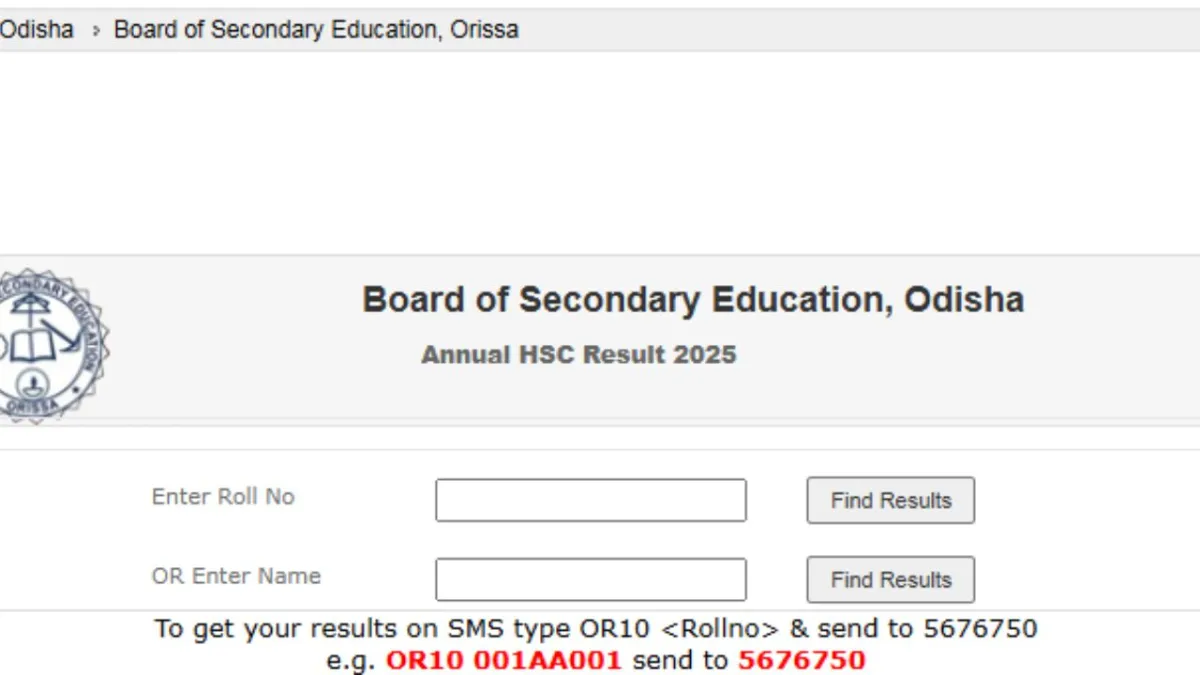
The Board of Secondary Education, Odisha, has announced the results of class 10th. Students who appeared in the exam can download their scorecards using their roll number, date of birth and other details on the login page, orissaresults.nic.in or bseodisha.nic.in. The board has activated the result link on its website. Students can access it by visiting the official website. In case the website is slow or not working, students can check their results via SMS or through the Digilocker app.
What are the ways to download BSE Odisha 10th Marksheet and Scorecard?
Students can opt for various ways if the official website is not working or they are in any no internet zone. These ways are as follows:
- Website
- SMS
- Digilocker app
How can i download BSE Odisha Matric results via SMS?
- Open the SMS application on your mobile phone.
- Type the message in this format: Result_OR10_Roll Number.
- Forward it to 56263.
- After a few moments, your result will be delivered directly to your phone via SMS.
BSE Odisha Result 2025: How can i download marksheets via WhatsApp?
Candidates can also download the BSE Odisha Class 10 result digitised certificates through WhatsApp. For this, the students have to send a “ BSE / Hi” WhatsApp message to 7710058192. The certificate will then be sent to the candidate’s whatsapp number.
BSE Odisha Result 2025: How can i download marksheets via WhatsApp?
Candidates can also download the BSE Odisha Class 10 result digitised certificates through WhatsApp. For this, the students have to send a “ BSE / Hi” WhatsApp message to 7710058192. The certificate will then be sent to the candidate’s whatsapp number.
BSE Odisha Matric Result 2025: How to download via Digilocker
- Visit the official website of Digilocker, or download the app on your phone.
- If you are not register, register yourself ( To register, click on Sign Up and provide the required details such as your name (as per Aadhaar), category, a valid mobile number, email ID, Aadhaar number, and a six-digit security PIN.)
- After registering, log in using your generated credentials.
- Go to the ‘Education’ section and select BSE Odisha.
- Next, click on the BSE Odisha 10th Result 2024 tab.
- Enter your Aadhaar number, and your Class 10 result will appear on the screen.
Check BSE Odisha Matric 10th Result latest updates
BSE Odisha Matric Result 2025: How to download online?
- Visit the official website, bseodisha.ac.in.
- Click on the BSE HSC Result link flashing under latest updates.
- It will redirect you to a new page.
- Now, enter your roll number or name.
- BSE Odisha matric result 2025 will appear on screen.
- Download BSE Odisha matric result 2025 for future reference.
