
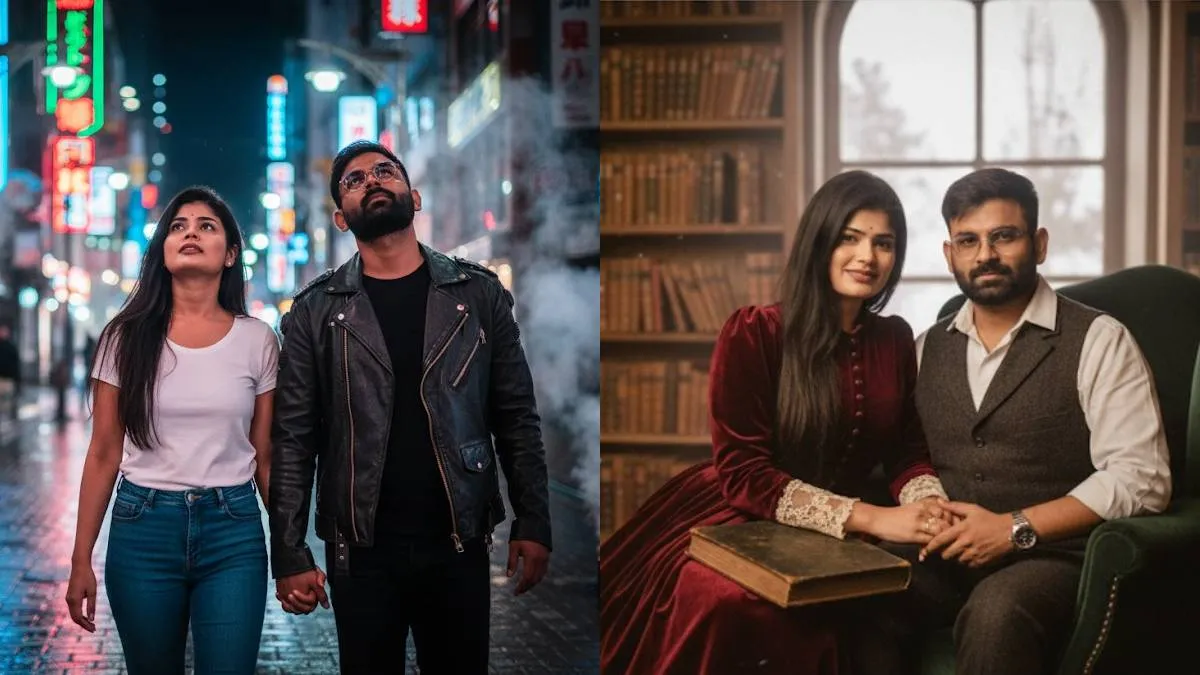
Gemini has launched a new feature called Nano Banana, which has become incredibly popular on social media. This feature allows users to create stunning images in various styles, with many related trends going viral. One of the most popular trends is creating AI couple photos.
Here's how to create a Google Gemini Nano Banana AI couple photo:
This feature is completely free with no usage limits, allowing you to create as many realistic portrait images as you like. Just follow these simple steps:
- First, install the Google Gemini app from the Play Store.
- Next, log in using your Google account.
- Then, type your command or prompt into the input area.
- Tap the '+' icon next to the input area to upload your image.
- Finally, tap the 'Run' or 'Ctrl+Enter' button.
The tool will then generate an AI image based on your command.
Top 3 prompts for couple photos:

- Urban Fantasy: Convert the uploaded image of the couple into a street photography image without changing the faces from the uploaded image. In the converted image, the couple is walking through a bustling Tokyo street at night, with a wide shot, holding hands and looking up at the neon signs. Man in a dark leather jacket, woman in a white t-shirt and jeans. Faces must match the reference photo exactly. Rain-slicked cobblestone street, with steam rising from drains and blurred neon signs in the background. Vibrant, dramatic lighting creates a cyberpunk and mysterious mood, emphasizing their connection amidst the chaos.
- Historical Fiction: Convert the uploaded image of the couple into a polaroid photo without changing their facial expression from the uploaded image. In the converted image, the couple is sitting by a large window in a rustic library, with a close-up shot, reading a worn book. The women is in a long, flowing Victorian-era dress with lace cuffs. Her smile must be gentle and warm, matching the reference photo. Room is filled with shelves of antique books and a burning fireplace. Soft, warm lighting creates a peaceful and intimate mood, emphasizing quiet reflection and comfort.
- Nature & Adventure: Convert the uploaded image of the couple into a cinematic image without changing the faces from the uploaded image. In the converted image, the couple is sitting around a campfire in a forest cabin, with a mid-long shot, laughing and roasting marshmallows. The man is in cozy flannel shirts, woman in warm sweaters. All faces must match the reference photo exactly. Log cabin interior with a stone fireplace, large window looking out onto a snow-covered forest. Warm, cozy lighting from the fire creates a loving and nostalgic mood, emphasizing family and adventure.
You can also create unique photos from these general prompt.
General prompt to create your unique images:
Convert the uploaded image of the couple into a [1. Photographic Style] image without changing the [2. Key Feature] from the uploaded image. In the converted image, the couple is in [3. Setting], with a [4. Shot Type], [5. Specific Poses/Actions]. [6. Detailed Appearance], [7. Key Features to Retain]. [8. Environment Details] [9. Lighting and Mood].
Elements and examples
- Photographic Style: The overall look and feel of the image. Examples: "cinematic," "polaroid photo," "watercolor painting," "street photography."
- Key Feature: The element that must remain identical to the original image. Examples: "face," "outfit," "facial expression," "the color of the car."
- Setting: The location where the subject is placed. Examples: "an old Indian local train," "a bustling Tokyo street," "a serene forest cabin," "a futuristic cityscape."
- Shot Type: The camera distance from the subject. Examples: "Mid-long shot," "close-up," "wide shot," "macro."
- Specific Poses/Actions: What the subject is doing. Examples: "sitting on the last seat," "running with a kite," "reading a book by the window," "holding hands while walking."
- Detailed Appearance: Specifics about clothing, accessories, etc. Examples: "Woman in a blue patterned cotton saree," "Man in a dark suit with a red tie," "A woman in a vintage floral dress."
- Key Features to Retain: Additional details that must match the original. Examples: "Faces must match the reference photo exactly," "The color of their hair should remain the same," "The dog's collar must be identical."
- Environment Details: Specifics about the background and props. Examples: "Vintage train interior, muted green walls," "Rain-slicked cobblestone street with neon signs," "Cozy cabin interior with a lit fireplace."
- Lighting and Mood: The emotional tone and light quality. Examples: "Warm, cinematic lighting creates a nostalgic and intimate mood," "Harsh, dramatic lighting highlights shadows," "Soft morning light creates a peaceful and calm atmosphere."
ALSO READ: Google Gemini photo trend: Top simple prompts for men to create unique looks