
Google has rolled out a host of new features to Android 16. With this update, the company has also changed how users receive updates to their smartphones. Instead of a single yearly release, the company will now provide more frequent updates.
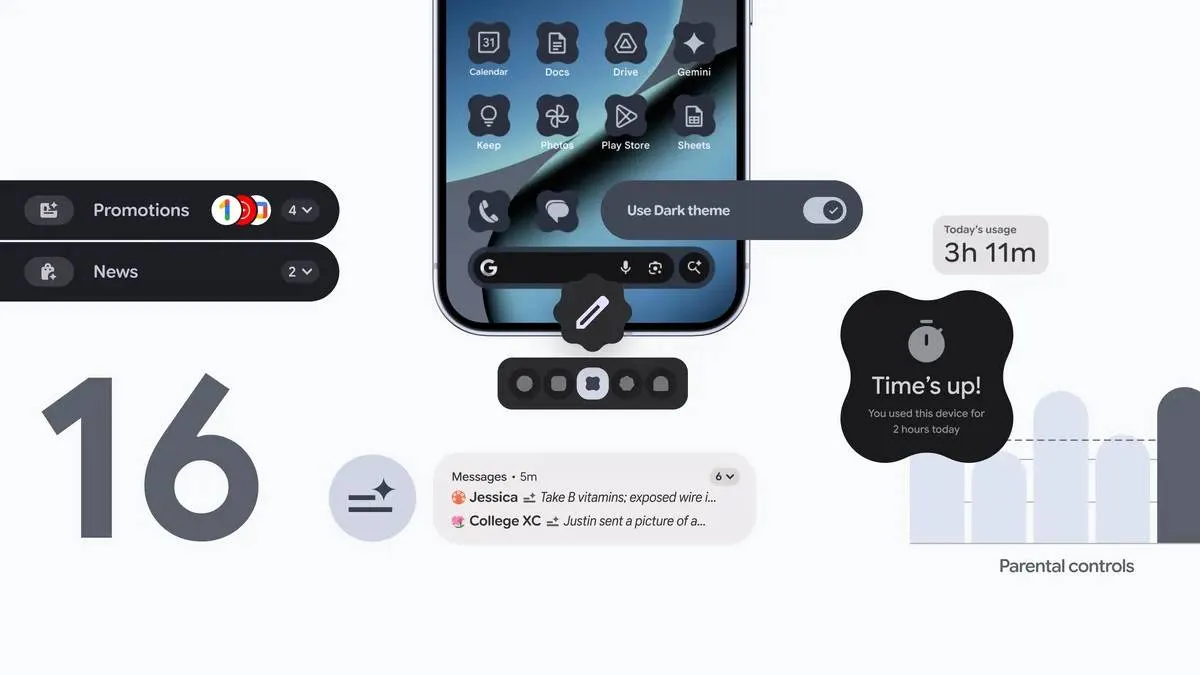
This update will first arrive on Pixel devices, bringing new functionalities to notifications, customisation options, parental controls, calls, Circle to Search, and captions. Here are the details on the new features:
Android 16 exclusive features
AI-powered notification summaries
Taking a cue from Apple Intelligence, Google has added AI-powered notification summaries to Android 16. This new feature will condense long messages and group chats into quick, summaries. Additionally, a new “Notification Organiser” will automatically group and silence lower-priority notifications, such as promotions, news, and social alerts.
More ways to customise
The new update offers users access to custom icon shapes, themed icons, and the option to automatically darken light apps, even those that lack a native dark theme.
New parental controls
Within Android settings, new parental controls will allow parents to set screen time limits, create downtime schedules, control app usage, and more for their children.
These updates are starting to roll out with Android 16 on eligible Pixel devices.
Features for all Android users
Google is also releasing some new updates that are not exclusive to Android 16 and will be available to other Android users as well:
- Call Reason: This is a new beta feature that allows users to flag calls to saved contacts as “urgent”. Recipients will see this on their incoming call screen. If they miss the call, the “urgent” note will remain in their call history.
- Expressive Captions: This feature will display the full emotion of speech with tags like [sad] or [joyful], whether it’s a video message or a post on social media. The company says this will allow users to get the full context of what’s being said when the sound is off.
- Unwanted Group Chat Detection: Google is making it easier to spot and exit unwanted group chats. If an unknown number invites a user to a group, they will receive an alert that shows key information about the group. The user can then quickly choose to reply, leave the chat, or block and report the number.
- Pinned Tabs in Chrome: Similar to Chrome on desktop, pinned pages in mobile will stay saved at the front of the browser, allowing users to pick up exactly where they left off.
- Circle to Search Scam Analysis: Users can now analyse suspicious messages with the Circle to Search feature. After initiating the feature, an AI Overview will appear, indicating whether the message is likely a scam.
ALSO READ: OpenAI CEO Sam Altman issues 'code red' for urgent ChatGPT improvements
